
The more flexible option isn’t always the better fit. For many growing businesses in the Philippines, off-the-shelf software works well when needs are standard and a quick rollout matters. Custom software may be a better choice when distinctive workflows or costly workarounds are holding operations back. In the custom software vs off-the-shelf comparison, the right answer depends on the work the system must support, not just its initial cost.
Both options can help a business run more smoothly, but they differ in upfront investment, integration, support, scalability, and security. This guide explains how to weigh those trade-offs and when combining ready-made tools with custom features may be practical. You’ll have a clear way to match your software choice to your processes, priorities, and growth plans.
Key Takeaways
- Match the software choice to how standard your processes are and how quickly you need a working solution.
- Compare total operating effort, including subscriptions, manual workarounds, integrations, and ongoing maintenance.
- Consider a tailored system when persistent workflow gaps or complex integrations are limiting growth.
- Use a decision guide to prioritize requirements and see whether ready-made tools, custom development, or a combination fits best.
Custom Software vs Off-the-Shelf Software: Which Is Better for Growing Businesses?
The choice between custom software and off-the-shelf software comes down to fit, speed, and the effort needed to operate each option. Custom development can align closely with unique workflows, but requires planning and ongoing maintenance. Ready-made platforms can launch faster, but may require changes to your processes.
Custom Software
Custom software is built around an organization’s processes, such as a CRM that follows its sales approvals or an ERP connected to existing systems. Its key advantage is a closer fit: teams can automate business rules and avoid workarounds that disrupt daily tasks. The trade-off is that development takes longer than adopting a ready-made product, and the business must plan for updates and maintenance.
Off-the-Shelf Software
Off-the-shelf software is a pre-built product for common needs, such as payroll, accounting, or project management. It suits businesses with standard processes, limited technical staff, or a need to deploy quickly. Vendors handle regular updates, and established products are often tested across many organizations. The downside is less control over features and workflows, so staff may need to adapt their steps to the platform.
Software Selection Questions
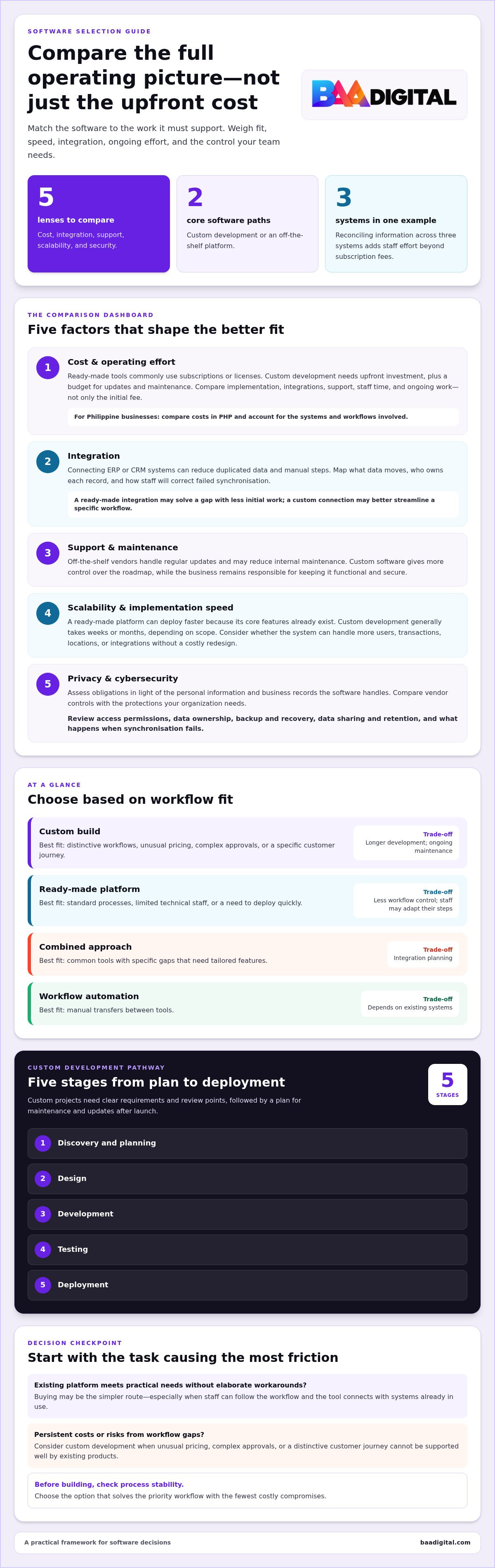
Start with the task causing the most friction. Does an existing platform meet practical needs without elaborate workarounds? Can staff follow its workflow, and does it connect with the systems already in use? If so, buying may be the simpler route. If unusual pricing, complex approvals, or a distinctive customer journey create persistent costs or risks, consider custom development. Also ask whether the process is stable enough to build into software.
| Option | Best fit | Trade-off |
|---|---|---|
| Custom build | Distinctive workflows | Longer development |
| Ready-made platform | Standard processes | Less workflow control |
| Combined approach | Common tools with specific gaps | Integration planning |
| Workflow automation | Manual transfers between tools | Depends on existing systems |
Choose the option that solves the priority workflow with the fewest costly compromises.
Comparing cost, integration, support, scalability, and security
Compare the full operating picture, not just the subscription or development cost. Integration effort, vendor support, growth needs, and data controls can all affect which option works better.
Custom and Off-the-Shelf Cost Estimates
Off-the-shelf software commonly uses a subscription or license model, while custom development requires an upfront investment shaped by project scope. A useful estimate includes implementation, integrations, maintenance, and staff time, not just the initial fee. For a Philippine business, compare each option in PHP and account for the systems and workflows involved.
Subscription costs can rise with per-user fees as teams grow. Custom development may reduce recurring licensing costs, but still requires a budget for updates and maintenance.
Implementation Speed and Scalability
A ready-made platform can be deployed faster because its core features already exist. Custom software generally takes weeks or months, depending on scope, but can be designed around specific workflows and future changes. Scalability is therefore a planning question: will the system accommodate more users, transactions, locations, or integrations without a costly redesign?
Integrating with existing ERP or CRM systems can reduce duplicated data and manual steps. Map the data exchanged, identify who owns each record, and decide how staff will correct failed synchronisation.
Long-Term Cost-Effectiveness
Calculate the total operating effort over time. For example, staff reconciling information across three systems create labour costs beyond subscription fees. A custom connection may streamline the workflow, while a ready-made integration may solve it with less initial work. Compare licensing, support, maintenance, integration, and manual work together.
Vendor updates and support can reduce internal maintenance for off-the-shelf tools. Custom systems offer more control over the roadmap, along with responsibility for keeping the software functional and secure.
Privacy and Cybersecurity Requirements
In the Philippines, consider data privacy and cybersecurity obligations in light of the personal information and business records the software handles. Map what data is collected, who can access it, how it is shared, and how long it is retained. Compare the vendor’s controls and responsibilities with the protections your organization needs.
Review access permissions, data ownership, backup and recovery processes, and what happens when synchronisation fails. These checks apply to custom and ready-made platforms; the key difference is who controls the system and its security roadmap. Businesses assessing tailored workflows can explore custom systems and web apps as one potential approach.
When should you consider custom software development?
Custom software development makes sense when existing products force costly compromises or cannot support a distinctive process. Compare development time, ownership, maintenance, and the operational value the system needs to deliver.
Development Time and Maintenance
A custom project may take weeks or months, depending on scope. Unlike adopting ready-made software, development typically moves through discovery and planning, design, development, testing, and deployment. Each stage needs clear requirements and review points. After launch, plan for maintenance and updates to keep the system functional as workflows and needs change.
Custom Software Ownership
Custom software gives a business control over its data, code, and product roadmap. That control can help teams prioritize changes around operational needs instead of waiting for a vendor’s release schedule. It also brings responsibility: assign someone to manage priorities, user feedback, budget, and performance after launch. Set expectations for code access and ongoing maintenance during project planning.
When Bespoke Development Is Worthwhile
Consider bespoke development when unusual pricing, complex approvals, field-based teams, or specialist compliance needs create persistent costs or risks. It may also be worthwhile when a distinctive customer journey is part of why clients choose the business. By contrast, established payroll software often suits a standard process that isn’t a competitive differentiator.
Start the choice between custom development and an existing product with the business problem. Document the current process, identify where workarounds or errors occur, then prioritize requirements before defining a build. Avoid hard-coding processes that are still changing. A discovery phase, technical review, or prototype can test assumptions early and reveal constraints before full development begins.
Definitions and examples of off-the-shelf software
Custom software is designed for a specific organization’s workflows, goals, and business rules. Examples include a CRM built around a company’s sales approvals, an ERP connected to its internal processes, or a logistics platform for coordinating field operations. Matching a distinctive process can support a competitive advantage, especially when the customer experience depends on how that process works.
Off-the-shelf software is pre-built for common business needs and can usually be configured after purchase. CRM systems, accounting packages, project management tools, and HR management systems fit this category. Microsoft Office, Salesforce, and QuickBooks are familiar examples. Businesses commonly access these products through a license or subscription, then adjust settings to suit their teams.
The practical difference is who adapts. With an off-the-shelf project management platform, a team may use the product’s existing task stages. A custom system can reflect specific review steps, approval rules, or reporting needs. Neither approach automatically makes a process more effective. First map the task, the people involved, and the information each step requires.
Use ready-made software for routine work such as accounting or standard project tracking. Its established features can automate familiar tasks without a separate build. Consider custom software when standard platforms cannot support a process cleanly, such as coordinating specialized delivery routes with internal inventory rules. A combined setup can also work: keep the standard accounting platform, then build a tool that connects it to a distinctive operational workflow.
To compare options, list required features, identify where staff currently repeat manual work, and separate essential needs from preferences. Then assess whether configuring an existing platform handles those needs or creates burdensome workarounds. For a process that needs a tailored digital system, explore custom web development as a way to shape software around the work.
BAA Digital: Custom Systems & Web Apps
BAA Digital helps businesses address workflow gaps with Custom Systems & Web Apps and Business Process Solutions. Consider a tailored build when standard platforms can’t support a core process cleanly or teams rely on manual workarounds to move information between systems.
When software needs to support customer-facing services, Business Websites & eCommerce can support online operations, while AI Tools & Automation can streamline suitable tasks. Start with a clear view of the business problem, the people affected, and the workflow the solution needs to support. This gives the project a practical foundation before defining features.
To discuss a software or workflow challenge, contact BAA Digital.
Make Your Next Software Decision Practical
Turn the comparison into a focused business decision. Identify the operational bottleneck, the people affected, and the change that would make their work easier. Then decide whether an existing platform can handle the need or a tailored system is a better fit. This keeps the choice between custom software and off-the-shelf tools tied to a real business outcome, not a feature checklist.
For teams ready to address a specific gap, BAA Digital offers Custom Systems & Web Apps, AI Tools & Automation, and Business Websites & eCommerce. These options can support different needs, from streamlining internal work to improving digital customer journeys. Start with a clear view of the process you want to improve, then contact BAA Digital to discuss the right solution.
Contact BAA Digital to discuss your options and take a practical next step toward software that supports your business as it grows.
Frequently Asked Questions
What is the difference between custom software and off-the-shelf software?
Custom software is developed around a business’s requirements, while off-the-shelf software provides features designed for common needs. In a custom software vs off-the-shelf comparison, consider who needs to adapt: the system or the workflow. For example, a standard sales tool may handle basic lead tracking, while a tailored system can reflect a company’s specific handoffs, approval steps, and reporting preferences.
How long does custom software development take compared with buying off-the-shelf software?
Custom development may take weeks or months, depending on project scope, while a ready-made product can often be acquired and configured sooner. For a practical comparison, separate the time to select and configure a platform from the time staff need to test it, migrate records, and adopt new steps. A custom project also needs time for requirements, development, testing, and deployment.
How do businesses calculate total cost of ownership and ROI for custom vs packaged software?
Calculate total cost of ownership by adding implementation, subscriptions or licensing, integrations, internal staff time, maintenance, and the cost of workarounds. Then compare that total with measurable operational value, such as fewer manual corrections or faster completion of a recurring task. Establish a baseline before rollout, track the same measures afterward, and use the same evaluation period for both options.
When should a Philippine business choose custom software over off-the-shelf software?
A Philippine business should consider custom software when a core workflow remains difficult to manage with available platforms and that friction affects service, accuracy, or growth. For example, a distributor with specialized order approvals may need a system that matches its process. If requirements are still changing, first document and stabilize the workflow; building around unsettled steps can lock in avoidable complexity.
What are the security, maintenance, and scalability risks of custom and off-the-shelf software?
Neither option is automatically more secure. A custom system can expose risks if updates, access controls, or backups are neglected; a packaged product depends partly on the vendor’s security practices and product roadmap. For either choice, define user permissions, backup ownership, update responsibilities, and a process for responding to incidents. Also plan how records and operations will continue if a system becomes unavailable.
How do integration, customization, and vendor support compare between the two options?
Off-the-shelf tools may offer existing connectors and configuration settings, but supported integrations and customization limits depend on the product. Custom software can be designed around required data flows, though those connections need testing and ongoing upkeep. Compare what support covers, how staff report problems, and who maintains each integration. For example, check whether a sales update appears consistently in the accounting workflow.

