

A browser-based tool should do more than move paperwork onto a screen. Custom web app development creates software around specific business workflows, letting staff or customers manage information and complete tasks in a browser. Unlike a standard website, which mainly presents information, a web app supports actions such as submitting requests, tracking work, and booking services.
If spreadsheets, disconnected tools, or repetitive admin are slowing a process down, a custom app can bring the steps together in one place. The right approach depends on who will use it, what they need to do, and how it must connect with existing systems.
This guide explains how custom web applications work and where they can help. You’ll learn how frontend, backend, platform, and database technologies fit together, and what planning, development, testing, deployment, and maintenance involve. This context can help you decide whether a tailored application suits your needs and understand the work required to support it over time.
Key Takeaways
- Match the app’s scope to the workflow it needs to improve, and define requirements early to guide planning and limit avoidable revisions.
- Understand how the interface, server-side logic, hosting platform, and database work together before selecting a technology stack.
- Build testing, deployment, and ongoing maintenance into the plan so the application can be monitored, updated, and supported after launch.
- Consider BAA Digital’s Custom Systems & Web Apps when your business needs a tailored system, connected process, or digital platform.
What is a custom web application (and why it matters)?
A web application runs in a browser and lets people complete tasks, not just read pages. Custom web app development shapes those tasks around business processes, such as customer bookings or staff approvals.
Scalability, Security, and Long-Term Costs
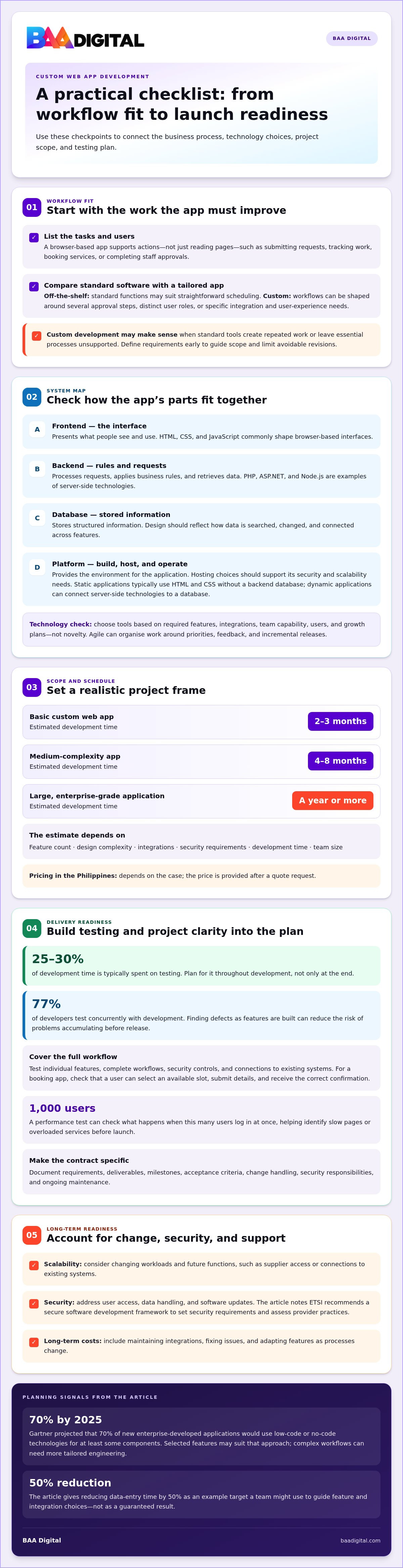
Scalability means an application can handle changing workloads and new functions as a business grows. A retail inventory app, for example, may later need supplier access or connections to existing systems. Security should be built into user access, data handling, and software updates. ETSI recommends using a secure software development framework to set security requirements and assess provider practices. Long-term costs include maintaining integrations, fixing issues, and adapting features as processes change.
Custom Apps Versus Off-the-Shelf Software
Off-the-shelf software offers standard functions, while a custom application is built around specific workflows. A ready-made booking tool may suit straightforward scheduling; a tailored portal may work better when there are several approval steps or distinct user roles. Choose based on workflow fit, integration needs, and the required user experience. Custom development makes sense when standard tools create repeated work or leave essential processes unsupported.
Project timelines depend on scope: a basic custom web app may take 2-3 months to develop, while a medium-complexity app can take 4-8 months. A large, enterprise-grade application can take a year or more. The estimate depends on feature count, design complexity, integrations, security requirements, development time, and team size. In the Philippines, the price depends on the case and is given after a quote request.
When choosing a development company in the Philippines, review its portfolio and client feedback, then assess how it turns requirements into a practical roadmap. Clear requirements help define the scope and reduce costly revisions.
A project contract should describe requirements, deliverables, milestones, acceptance criteria, change handling, security responsibilities, and ongoing maintenance. These details clarify how the team will assess progress and manage changes during development.
Frontend, backend, platform, and database technologies
A web application combines an interface, server-side logic, data storage, and hosting. The right technologies depend on its features, users, integrations, and growth plans.
Technology Stacks and Development Approaches
A technology stack is the set of tools that work together to build and run an application. HTML, CSS, and JavaScript commonly shape browser-based interfaces, while server and database choices support business processes behind them. An Agile approach can organise development around priorities, feedback, and incremental releases. Gartner projected that 70% of new enterprise-developed applications would use low-code or no-code technologies for at least some components by 2025. That approach may suit selected features, while complex workflows can need more tailored engineering.
Frontend and Backend Frameworks
The frontend presents the interface; the backend processes requests, applies business rules, and retrieves data. For example, a booking screen can collect a preferred appointment time, while backend logic checks availability and saves the booking. HTML, CSS, and JavaScript support browser interfaces. PHP, ASP.NET, and Node.js are examples of server-side technologies used for dynamic applications. Choose a framework based on required features, integration needs, team capability, and the intended user experience. A useful technology review connects those choices to business goals rather than selecting tools for novelty.
Platforms and Databases
A platform provides the environment where developers build, host, and operate a web application; a database stores its structured information. Static applications typically use HTML and CSS without a backend database. Dynamic applications can connect server-side technologies, such as PHP or Node.js, to a database. A customer portal, for instance, needs to retrieve account details and update submitted requests. Database design should reflect how information is searched, changed, and connected across features. Hosting choices should also support the application’s security and scalability needs.
Web development consulting helps translate requirements into a practical stack and development approach. For instance, a team might target a 50% reduction in data-entry time, then select features and integrations around that goal. A focused web development planning discussion can help align technology decisions with the intended workflow.
Testing, hosting, deployment, and ongoing maintenance
Testing checks whether software behaves as intended before and after release. In custom web apps, teams test individual features, full workflows, security controls, and integration with existing systems. Testing typically takes 25-30% during development, so it needs planned time rather than a final-day review. For a booking app, testers can confirm that users can select an available slot, submit details, and receive the correct confirmation.
Automated tests can catch repeatable issues, while manual checks reveal usability problems across real workflows. The development team can also test performance by checking what happens when 1,000 users log in at once. That scenario helps identify slow pages or overloaded services before launch. Testing alongside development is common: 77% of developers test concurrently with development. Fixing defects as features are built can reduce the risk of problems accumulating before release.
Deployment moves a tested application into its live hosting environment. The team prepares the hosting platform, configures access and data connections, then releases the software. A staged release can make the application available to a limited group before a wider rollout. For an enterprise portal, this can help surface issues with account permissions or integrations without disrupting every user. Monitoring after launch helps identify errors, slow response times, and failed connections.
Maintenance keeps the application secure, compatible, and useful as business processes change. Annual maintenance for a custom application is typically budgeted at 15-20% of its initial development cost. Post-development maintenance often accounts for 50% to 80% of a software product’s total lifetime cost. This work may include updating dependencies, fixing defects, reviewing access controls, and improving performance. A clear maintenance plan assigns responsibility for updates, backups, monitoring, and user-reported issues.
Optimization continues after release. Teams can review usage patterns, support requests, and performance logs to identify friction. For example, repeated checkout errors may point to a confusing form or integration failure. Prioritising fixes by business impact helps keep the web application dependable as its users and requirements evolve.
Consulting, custom development, and ongoing support
Consulting connects business goals to the workflows a custom web application must support. A discovery discussion can map who handles each task, where delays occur, and which decisions could be automated. For example, a service team might trace a request from customer submission through staff approval to resolution. This process map helps distinguish essential features from advanced options that can wait. The result is a clearer scope, a practical delivery sequence, and a shared view of success.
Custom development turns that scope into software shaped around the organisation’s actual processes. Teams can prioritise one high-value workflow, such as routing incoming requests, before adding secondary capabilities. Short development sprints offer regular opportunities to review working features and refine requirements. Each review should compare the application with agreed user needs, not just a feature checklist. This keeps decisions grounded in daily operations and helps stakeholders understand how each change affects delivery.
Ongoing support covers the work that begins after release: maintaining software, resolving defects, and adapting features as processes evolve. A management system, for instance, may need a revised approval path when responsibilities change. Support planning should define how users report problems, how updates are reviewed, and who decides on new work. It should also identify useful performance signals, such as incomplete submissions or repeated support requests, to help prioritise improvements.
A practical engagement leaves the business with documented requirements, defined responsibilities, and a way to evaluate progress. Before development starts, align the project’s goals, user roles, integrations, and acceptance criteria. During delivery, review working features and record approved changes. After launch, use feedback and operational data to guide maintenance. This approach gives stakeholders the ability to manage scope and keep the application tied to business needs. Discuss your custom application requirements to plan a practical next step.
BAA Digital: Custom Systems & Web Apps
BAA Digital develops custom systems and web apps for businesses that need software aligned with their workflows. Choose its Custom Systems & Web Apps service when standard tools don’t match how your team handles requests, approvals, records, or customer interactions. The work connects practical requirements with a system designed around users’ tasks and business processes.
For operational bottlenecks, Business Process Solutions can help organise workflows, while AI Tools & Automation can support suitable repetitive tasks. If your needs centre on selling online or presenting your business, Business Websites & eCommerce may be a better fit than a tailored application. Start with the process you need to improve, the people who will use the solution, and the tasks it must support.
Contact BAA Digital to discuss the workflow or digital system you want to build.
Turn a Clear Workflow Into Your Next Step
The most useful next step is to choose one business process that needs a better digital tool. Define who is involved, the outcome they need, and what currently slows the work down. This gives custom web app development a clear purpose and keeps future decisions tied to practical needs.
BAA Digital offers Custom Systems & Web Apps for tailored workflows, alongside AI Tools & Automation and Business Websites & eCommerce for related digital needs. The right direction depends on whether your priority is a specialised system, task automation, or supporting online business activity.
Bring your workflow, goals, and key requirements into the discussion. Contact BAA Digital to discuss your project and explore a practical path forward. A well-defined starting point can help your team move from an operational challenge to a solution built around how you work.
Frequently Asked Questions
What Is Custom Web App Development?
Custom web app development creates browser-based software tailored to an organisation’s specific needs. Rather than forcing every team into the same workflow, an app can support distinct user roles, approval rules, and data views. For example, an association could build a member portal for updating profiles and submitting renewal requests. The application’s functions are shaped around the tasks its users need to complete.
How Are They Different from a Standard Website?
A standard website primarily publishes content, while a web application gives users tools to carry out tasks. The distinction can overlap: a business website may include an interactive booking feature, while a customer portal may combine help pages with account functions. Consider what visitors need to do. If they must save information, manage requests, or access personalised records, app functionality may be needed.
How Much Will It Cost to Develop Your Web App?
The price depends on the project and is provided after a quote request. An estimate reflects the scope of the features, interface requirements, integrations, security needs, and development work involved. A staff dashboard with a single data source has different requirements from a customer platform connecting several systems. Defining the essential workflow first helps clarify the project scope and supports a more useful estimate.
How much does a custom web app cost?
There isn’t one fixed price for every custom application. In the Philippines, the price depends on the project and is provided after a quote request. Key cost factors include the number and complexity of features, design requirements, integrations, security needs, and development effort. For budgeting, separate essential launch functions from later enhancements. This helps set priorities without building features before users need them.
Real-World Examples: What Does a Custom Web App Look Like?
A custom web app could be a supplier portal where business customers submit purchase requests and track their status. Staff could review requests through a separate interface, with access based on their roles. Another example is a learning platform that organises course materials and learner activity. In both cases, the application brings a defined group of users and tasks into a purpose-built digital workflow.
What is Web Application Development?
Web application development is the work of planning and creating software people use through a browser. It turns requirements into an interface, application rules, and data handling. For example, a service request tool needs to capture a user’s details, route the request to the right team, and show its current status. Development connects these functions into a coherent, usable product.

